
If you want the ad made inside Codex, Cursor, or Claude Code, install one thing. That thing is the Topview Plugin.
Skill, MCP, and Canvas are not three more products lined up next to it. On the plugin page (https://www.topview.ai/plugin), a skill is a named ad recipe you call after the plugin is already installed. On a different page, Topview Skill is a separate package with a different install sentence. MCP is the word the Codex install guide uses for the login that authorizes the plugin, and it is also the name of a separate marketing-agent product. Canvas is the board the plugin opens. Chat is the log, not the studio.
YouTube does not keep those four words apart. This post does.
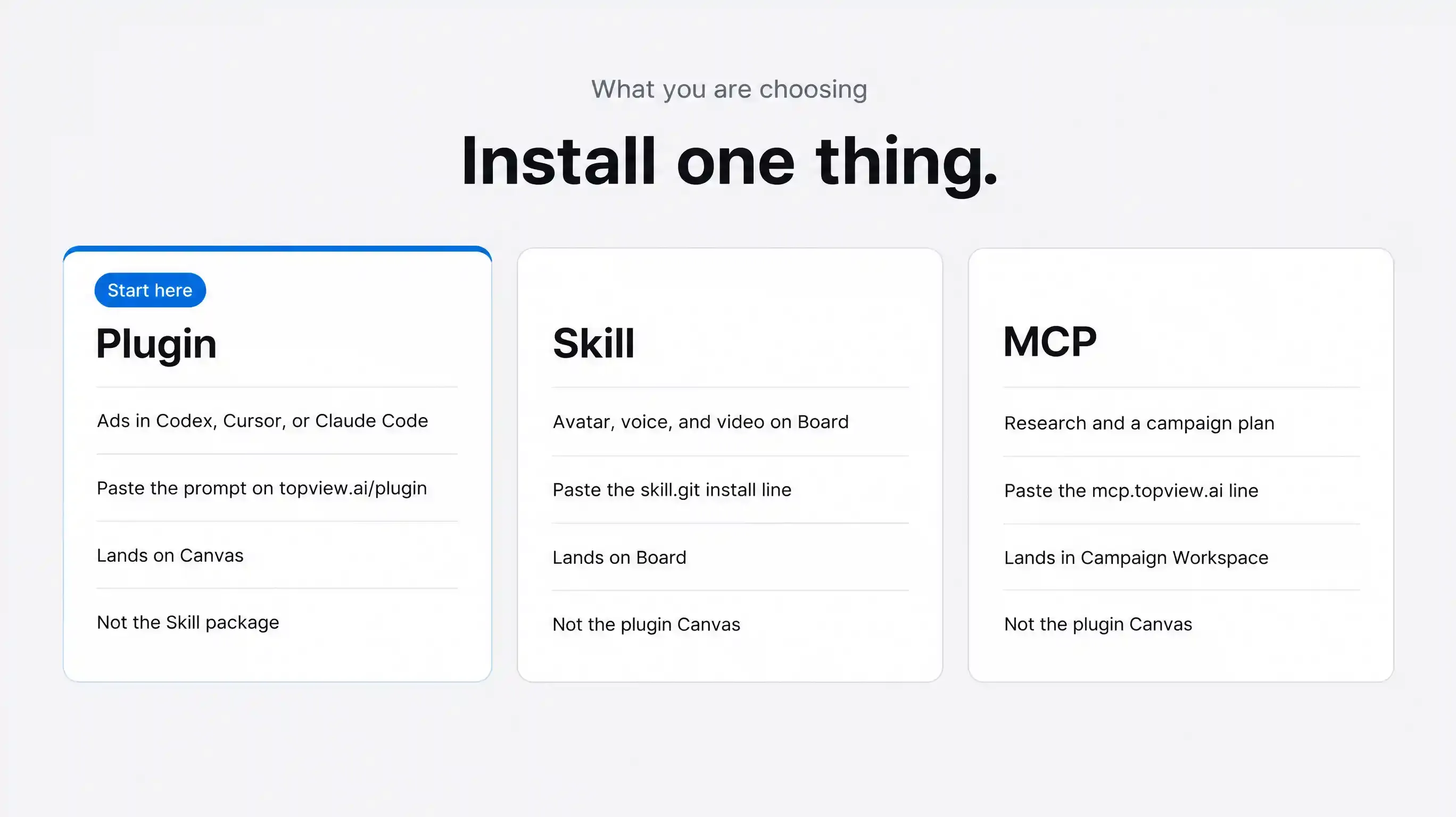
What you are choosing
If you want ads made in Codex, Cursor, or Claude Code, with a board you can edit, paste the host prompt on https://www.topview.ai/plugin. The Codex line is the goal prompt that points at docs/codex.md. You get the Topview Plugin: Agent for intent, Canvas for the cut, and built-in video skills as recipes. You do not get the Skill package, and you do not get the marketing team on the MCP page.
If you want video, image edit, a talking avatar, or voice, managed on Board, paste this sentence to the agent:
Install Topview Skill for me: https://github.com/topviewai/skill.git
You get Topview Skill (https://www.topview.ai/skill). The hosts listed on that page are Claude Code, Hermes, and Cursor. You do not get the plugin page’s Agent-plus-Canvas workspace. Codex is not on that host list.
If you want a researcher, a strategist, and a producer from one campaign brief, paste this sentence:
Help me install this MCP locally and provide the login authorization guide: https://mcp.topview.ai/mcp
You get Topview MCP (https://www.topview.ai/mcp). Deliverables land in a Campaign Workspace. You do not get the plugin’s Canvas unless you also install the plugin.
The Codex prompt on the plugin page, as of 18 September 2026, is this whole sentence. Paste it as plain text:
/goal Read https://github.com/topviewai/plugins/blob/main/docs/codex.md to install TopviewAI, complete OAuth, and set up a new task for me. After installation and authorization succeed, introduce to me what things the Topview plugin can do.
Cursor and Claude Code each have their own prompt on the same page. Do not paste the Codex goal prompt into Cursor. The plugin FAQ says Cursor uses a single-restart authorization handoff.
What the plugin page says the Plugin is
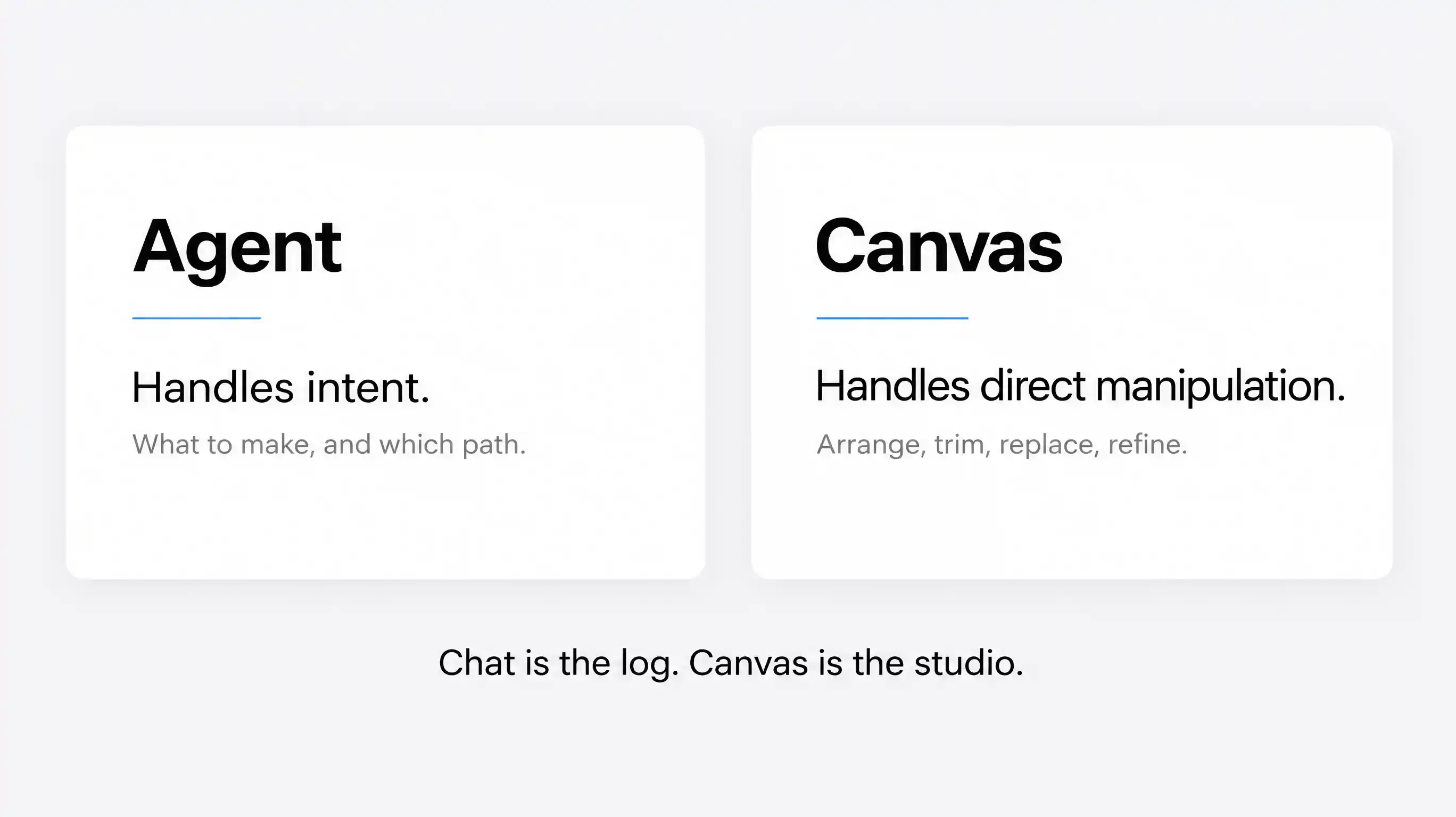
The page headline is: Your creative workspace inside your Agent. The next line is the split to keep: Agent handles intent. Canvas handles direct manipulation.
The FAQ is narrower than a model playground. It says the Topview Plugin gives an AI Agent a creative workspace for images, videos, campaigns, and Canvas. It lets the agent move from context and intent to assets without a separate copy-and-paste workflow.
The hosts named for install prompts are Codex, Cursor, and Claude Code. The page also shows a Blender tab. This post does not cover that install.
The page names three production workflows:
batch ecommerce ads
viral remakes from a reference video
multi-round short drama, from idea to script, storyboard, shots, and final video
It also names data lookup for TikTok, YouTube, Amazon, and Shopee, and models including Seedance 2.5, wan3, minimax h3, Kling 3, omni, Vidu Q3, and GPT Image 2.
One plan limit belongs in the first screen, not the footnotes. The FAQ says Unlimited does not support any automated workflows, so it cannot be used with Topview MCP, Plugin, or Skill. The same sentence is on the Skill page and the MCP page.
Canvas is the board the Plugin opens
Use the agent when it is easier to explain intent or pick a direction. Use Canvas when it is easier to arrange, trim, replace, reorder, or fine-tune. That is the plugin FAQ, not a metaphor.
The page’s tool list for that board includes node links, snap-to-align, a minimap, groups, Draw to Edit, product cards, color-palette extract, video extend, crop, and prompt reverse. Characters, scenes, products, props, and reference assets stay attached to the project, so the next shot does not start by hunting the same files out of the chat.
Generated images, videos, references, and variations are organized in Topview Canvas. The page says not to treat chat history as the final workspace.
Two other canvases are not this board.
The site map lists an AI Canvas at https://www.topview.ai/ai-canvas. On 18 September 2026 that URL returned 404. Do not write it up as a live website product until the page is back and the body has been read.
The MCP page says production can happen on one infinite canvas inside a Campaign Workspace. That sentence lives on the MCP page. Do not treat it as the plugin’s Topview Canvas.
My verdict: Open Canvas when you need to see the product, the reference, and the versions on one board. Stay in chat only when you are still deciding what the ad should be.
Built-in video skills are recipes, not an install
After the plugin is in, the agent can call ready-made video skills from the same conversation. The page lists TikTok Product Ad, Micro-Drama Ad Creator, Try-On Product Ad, and Pain Point Product Ad, plus Ghibli-inspired video and cinematic toolkits. The instruction on the page is simple. Pick a skill, attach your product, and generate without leaving the conversation.
These are recipes inside the Topview Plugin, not the package at topview.ai/skill.
The official Codex guide also says that after restart you should check that the topview connection and Topview skills are available. In that document, those skills are part of the plugin install. They are not a cue to paste the Skill git line.
Topview Skill is a different install
Topview Skill (https://www.topview.ai/skill) is a capability package. The page defines a skill as docs, execution rules, scripts, and reference materials, so the agent can repeat a type of task instead of inventing the method each time. The package follows the Claude Skill protocol. The install sentence is:
Install Topview Skill for me: https://github.com/topviewai/skill.git
What that page offers is text-to-video, image-to-video, reference-based generation, image create and edit, talking avatars, text-to-speech, voice search, and voice cloning. Results are viewed, managed, and edited in Topview Board.
The platforms listed on that page are Claude Code, Hermes, and Cursor. Codex is not in that list. One FAQ also says the toolkit can be installed into OpenClaw or another compatible agent. If the reader’s open app is Codex, this sentence is the wrong paste.
When not to use Topview Skill: you wanted the plugin’s Canvas, a product card, and a named ad recipe such as TikTok Product Ad. The Skill git line will not open that workspace.
mcp login is the plugin’s authorization, not a second product
The Codex guide in the topviewai/plugins repository tells a local Codex Desktop or CLI to add the marketplace at https://github.com/topviewai/plugins, add the plugin named topview@topview, then run this command:
"$CODEX" mcp login topview
The guide says that last command is mandatory. It opens the Topview OAuth flow. Installation is not finished if OAuth did not start or did not finish. The check is mcp get topview. Only then does the user restart and open a new task.
So in a plugin article, that MCP command means the connection and the login. The reader does not study the protocol. They finish the login the guide opens, restart, and go back to the ad.
Do not describe that command as “install Topview MCP.” The product with that name uses a different URL.
Topview MCP is a marketing team
Topview MCP (https://www.topview.ai/mcp) calls itself a full-stack AI marketing agent. One campaign brief can activate a Market Researcher, a Strategist, and a Producer. The outputs it names are an Audience Insight, a Message Map, a Campaign Plan, and a Content Brief, filed in a Campaign Workspace. Its own FAQ says those assets stay in the Campaign Workspace and Board.
The install sentence is:
Help me install this MCP locally and provide the login authorization guide: https://mcp.topview.ai/mcp
The quick start on that page begins with Open Codex Chat, then paste that sentence, then open the login link. Clients named there include Claude, ChatGPT, Cursor, and other MCP-compatible clients. A reasonable first brief on that page is: Launch a campaign for this product.
When not to use Topview MCP: you already know the ad, and you want the plugin’s Canvas and a built-in video skill. Pasting the mcp.topview.ai address does not install the plugin. When to use it: you still need the research and the campaign pack before anyone generates a shot.
Where the file actually lands
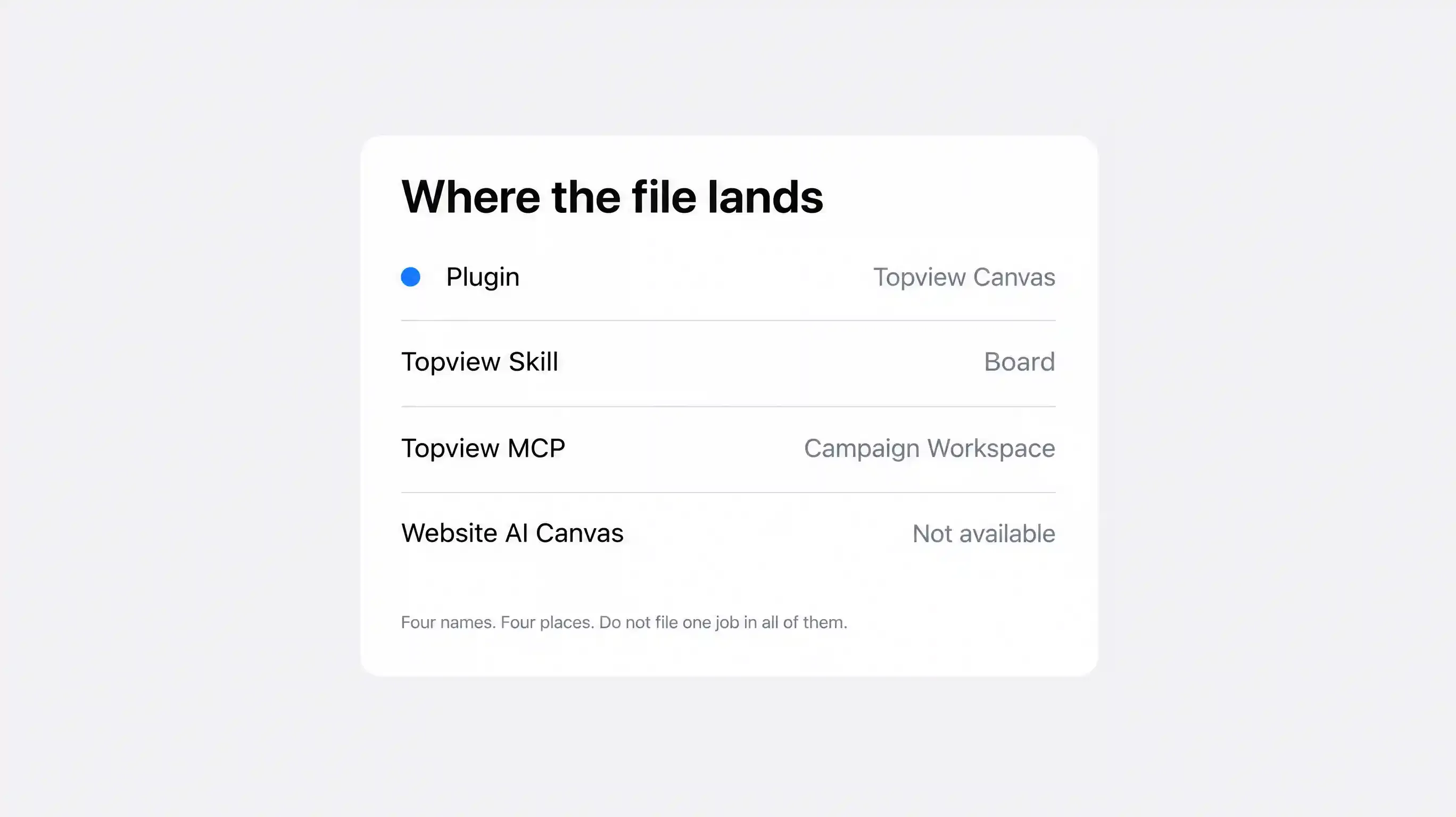
Plugin work is organized in Topview Canvas, inside the host conversation. The install sentence is the prompt on the plugin page.
Topview Skill results are viewed on Topview Board. The install sentence is the Skill git line above.
Topview MCP plans are filed in a Campaign Workspace. The MCP FAQ also mentions Board. The install sentence is the mcp.topview.ai line above.
The website AI Canvas is not available. https://www.topview.ai/ai-canvas returned 404 on 18 September 2026. Do not send anyone there until it resolves.
Why the YouTube videos glue the words together
None of the four films teaches this split. What they say is not the install spec.
The official film is titled Turn Codex Into an AI Video Studio | Topview Plugin. The voiceover never says plugin. It tells Codex to find the best TikTok angle and turn it into a finished ad, says to choose from over 100 specialized creative skills, and says every reference, generation, and version stays in one project. It ends by calling Topview the creative execution layer for Codex. It does not say Canvas, and it does not say MCP. The plugin page does not list 100 skills. That number is the film’s line, not a count on the product page.
Josema Fernández’s film is titled as TopView MCP in Codex: https://www.youtube.com/watch?v=uWFg7BOY1m8. The chapter list starts with Instalación TopView MCP en Codex. The description says he connects Codex to Topview by MCP, researches an olive-oil bottle, and makes ads. In the same walkthrough he installs from a plugin menu, and the Spanish auto-captions call Topview Canvas a skill. Title, menu, and captions are not using one vocabulary. His chapter titles are not the install steps.
Cavidade’s film is titled Topview Plugin: https://www.youtube.com/watch?v=-OuZZYvBmGQ. The chapter list still says Instalando o plugin MCP Skills da TopView. He chooses plugin for Codex, and the authorization line in the auto-captions is a Topview MCP connection. The useful part for a later tutorial is the job he ran: an Amazon link, three creative directions, one vertical cut, then a reference still on Canvas because the product did not match. That is a plugin walkthrough with mixed labels, not a definition of MCP.
YAHA’s description says the tool is the Topview Plugin for Codex, Cursor, Claude Code, and Blender, and describes a 30-second cup ad with identity lock. https://www.youtube.com/watch?v=CV7HX6qFglc. What the voiceover called Skill, MCP, or Canvas is unknown. The video has no captions.
Which sentence to paste
Open the desktop app you will actually use. The Codex guide wants a local Codex Desktop or CLI, not a browser chat that cannot run that install.
If the job is the ad, copy only the prompt on https://www.topview.ai/plugin for that host. Send it. Finish OAuth. Restart. Start a new task.
Leave the Skill git line for the day you want Board, avatars, and voice, and you are in a host that page lists.
Leave https://mcp.topview.ai/mcp for the day you want the Researcher, Strategist, and Producer.
After the plugin answers, name the built-in video skill and attach the product. Then judge the take on Canvas, not in the scrollback.
Turn the brief into a take. Lock one packshot, send the plugin install prompt to the host you have open, and ask for one vertical product ad. Do not paste a second install sentence just in case.
Start here: https://www.topview.ai/plugin
When not to use this
Skip this if you wanted talking avatars and voice on Board. That is Topview Skill, and it has a different install sentence.
Skip this if you still need a researcher, a strategist, and a producer. That is Topview MCP.
Skip this on the Unlimited plan. Unlimited does not run Plugin, Skill, or MCP.
Skip this if you expected the four YouTube films to demonstrate Try-On or Pain Point. Those names are on the plugin page. The films did not show them.
Skip this if you expected one click to produce a UGC cut, a cinematic cut, and a lifestyle cut. The page says batch ecommerce ads. It does not name that trio as a button.
FAQ
Can I do this in normal ChatGPT on the web? The plugin page has a card labeled ChatGPT Plugin, and the copy says Codex and ChatGPT. The Codex install guide still requires a current local Codex Desktop or CLI. A browser tab that cannot run that guide is not the install.
Is TikTok Product Ad the same as Topview Skill? No. TikTok Product Ad is a built-in video skill on the plugin page. Topview Skill is the git package, and its results are on Board.
If the guide says mcp login, did I install Topview MCP? No. That command is the OAuth step in the plugin’s Codex guide. Topview MCP is the product whose install URL is https://mcp.topview.ai/mcp.
Where should I look for the file? Plugin work is organized in Topview Canvas. Skill results are on Board. MCP plans are in the Campaign Workspace. Do not file the same job in all three.
Does Unlimited include Plugin, Skill, or MCP? No. The FAQ on all three pages says Unlimited does not support those automated workflows.
What assets do I need for the first test? One product still, the host prompt from the plugin page, and one job: a short vertical ad. Add a reference only if the first take does not match the product. Save the marketing-team brief for the MCP product, if you still do not know which ad to make.