

Veo 3.2 AI Video Generator4K Videos with Native Audio
Google DeepMind's most advanced video generation model — now available on Topview Board. Generate cinematic 4K videos with synchronized audio, lip sync, and multi-format support.
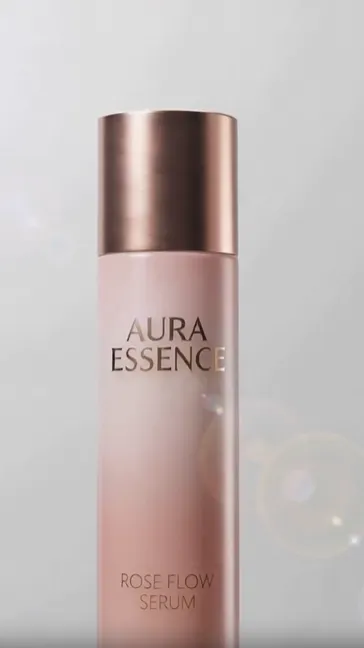
15s Video: Style: Simple light luxury, clear and hydrated, high-end feel, no dialogue. Shot 1 (0–3s) Appearance: Light pink gradient simple background, soft light evenly distributed. The essence bottle gently rises from the bottom of the frame, stopping in the center, showcasing the transparent bottle body, exquisite cap, and high-end texture. Shot 2 (3–6s) Display: Product rotates slowly at a constant speed, with light forming clean highlights on the bottle. A few small, crystal-clear microbeads gently float around, refracting soft light to represent hydration. Shot 3 (6–9s) Texture: Microbeads slowly approach the bottle and gently adhere to the surface, no splashing, no exaggeration. Highlights the clear, moisturizing, and delicate visual feel. Shot 4 (9–12s) Absorption: Microbeads slide down the bottle extremely gently, resembling the texture of essence being absorbed by the skin, with clean and soft movement. Emphasizes lightness, non-stickiness, and easy absorption. Shot 5 (12–15s) Closing: All microbeads slowly disappear, light focuses on brightening the product. The essence bottle settles steadily in the center of the frame, pure, high-end, and closing. @Image 2
What Creators Are Making with Veo 3.2
From product demos and brand stories to music videos and manhua dramas — Veo 3.2's native audio and 4K output give every creator a production-grade toolkit on Topview Board.
UGC Product Videos
Generate creator-style unboxing, try-on, and product demo clips with natural voiceover and handheld camera feel. Great for social ads, influencer-style content, and marketplace listings.
Brand E-Commerce Videos
Create polished product hero shots, lifestyle scenes, and campaign visuals with studio-level lighting, smooth camera movement, and synchronized audio for brand storefronts and ad creatives.
Cinematic Short Films
Produce film-grade scenes with dramatic pacing, cinematic color grading, and immersive native audio. Ideal for brand films, trailers, and narrative-driven campaign content.
AI Music Videos
Turn a single track into a full music video with synchronized visuals, dynamic transitions, and mood-matched cinematography — no filming crew needed. Great for indie artists, labels, and promotional clips.
Real Estate & Product Walkthroughs
Animate floor plans, 3D renders, and product photos into smooth cinematic walkthroughs with ambient audio. Property videos increase listing views by up to 400% and cut time-on-market in half.
Education & Explainer Animations
Generate engaging animated lessons, science simulations, and step-by-step visual guides from text descriptions. Produce professional-grade learning content at a fraction of traditional production cost.
Manhua Drama
Turn manga panels and comic storyboards into animated drama clips with cinematic pacing, expressive character motion, and synchronized dialogue. Perfect for webtoon adaptations, short-form manhua series, and comic IP promotion.
What Is Veo 3.2?
Veo 3.2 is Google DeepMind's latest AI video generation model that creates photorealistic videos with synchronized native audio. It supports 4K upscaling, 9:16 vertical format, scene extension, and "Ingredients to Video" — generating consistent characters and styles from up to 3 reference images.
Unlike basic text-to-video tools, Veo 3.2 produces rich native audio — from natural dialogue and conversations to precise sound effects — all synchronized with the visual content. On Topview Board, you can access Veo 3.2 directly — no API keys, no code, no complex setup.
Resolution
720p, 1080p, 4K upscaling
Duration
4–8s clips, extendable to 60s+
Audio
Native 48kHz with dialogue & SFX
Frame Rate
24fps, 30fps, or 60fps
Aspect Ratio
16:9 landscape, 9:16 vertical
Key Features of Veo 3.2
Complete audiovisual experiences — from 4K cinematic quality to synchronized native audio
4K Video Generation
Generate videos at 1080p natively, upscale to 4K for cinematic quality. Frame rates up to 60fps for smooth, professional output.
Native Audio Sync
AI generates synchronized dialogue, sound effects, and ambient audio — no separate voiceover or sound design tools needed.
Ingredients to Video
Guide generation with up to 3 reference images for character consistency and visual style control across every frame.
Scene Extension
Create longer videos by chaining clips with visual continuity. Extend beyond 8-second clips to 60+ seconds of coherent content.
Frame Transitions
Control narrative flow with first-frame and last-frame guidance. Define how your video starts and ends for precise storytelling.
Vertical Video (9:16)
Native vertical format optimized for TikTok, Instagram Reels, and YouTube Shorts — no cropping or re-editing needed.
How to Use Veo 3.2 in Topview (3 Steps)
Enter a prompt
Describe the video you want using natural language.
Generate Video
Click generate and watch Veo 3.2 bring your ideas to life in seconds.
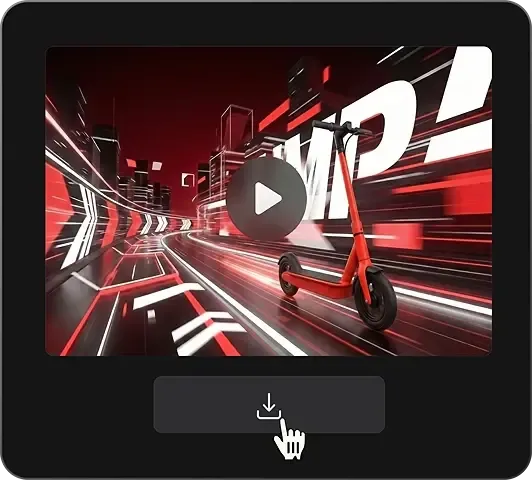
Download the video
Export a clean MP4 when you're ready.
Veo 3.2 for Every Format & Platform
Native support for both 16:9 and 9:16 — one prompt, every platform
| Platform | Format | Use Case |
|---|---|---|
| TikTok | 9:16 vertical | Viral clips with native audio, product reveals |
| Instagram Reels | 9:16 vertical | Brand storytelling, lifestyle content |
| YouTube | 16:9 landscape | Cinematic ads, explainers, intros |
| Meta Ads | 16:9, 9:16 | Performance marketing, retargeting creatives |
| Product Videos | 16:9, 1:1 | E-commerce listings, product showcases |
Veo 3.2's native support for both landscape and vertical formats makes it a natural fit for every major platform. Generate a cinematic YouTube ad, then create a TikTok-ready vertical version — all from the same prompt on Topview Board.
Why Use Veo 3.2 on Topview Board?
The easiest and most powerful way to access Veo 3.2 — alongside every other leading AI video model
All AI Video Models in One Board
Access Veo 3.2 alongside Sora, Kling, Runway, Seedance, Hailuo, Wan, and more — all on the same collaborative canvas.
No API Setup, No Code
Using Veo 3.2 through Google's API requires developer setup, API keys, and per-second billing. On Topview, just open the Board and start creating.
Side-by-Side Model Comparison
Generate the same prompt across Veo 3.2, Sora, and Kling simultaneously. Compare quality, audio sync, and visual style — pick the best result.
Real-Time Collaboration
Share your Board with team members. Everyone can view, comment, and iterate on AI-generated videos together.
One Subscription, All Models
No separate API billing for each model. Topview's unified subscription gives you access to every supported model.
All-in-One Creation Workflow
From image to video to publishing, Topview lets you complete the whole workflow in one place instead of switching between separate tools.
Veo 3.2 vs Other AI Video Models
Every model has its strengths — on Topview Board, use them all
| Feature | Veo 3.2 | Sora 2 | Kling 3.0 | Runway Gen-3 |
|---|---|---|---|---|
| Developer | Google DeepMind | OpenAI | Kuaishou | Runway ML |
| Max Resolution | 4K (upscaled) | 1080p | 4K 60fps | 1080p |
| Native Audio | ||||
| Max Duration | 8s (60s+ extended) | 20s | 15s | 10s |
| Vertical Video | ||||
| Reference Images | Up to 3 | Cameo | Character lock | Style ref |
| Scene Extension | ||||
| On Topview |
Veo 3.2 excels in audio quality and 4K resolution, Sora in physical simulation, Kling in cinematic duration, and Runway in professional VFX control. On Topview Board, you don't have to choose — use them all and pick the best result.
Start Creating with Veo 3.2 — Free
Experience Google's most advanced video model directly on Topview Board. No API keys. No code. No per-second billing surprises.
No credit card required · All major AI models included · Real-time collaboration