

Trình tạo video AI Gen-4.5Runway hình ảnh thành video
Dùng Runway Gen-4.5 trong Topview để làm sống khung đầu mạnh, dẫn chuyển động bằng câu lệnh điện ảnh, và có nhất quán thời gian sạch hơn cho quảng cáo, shot sản phẩm và cảnh video thương hiệu.
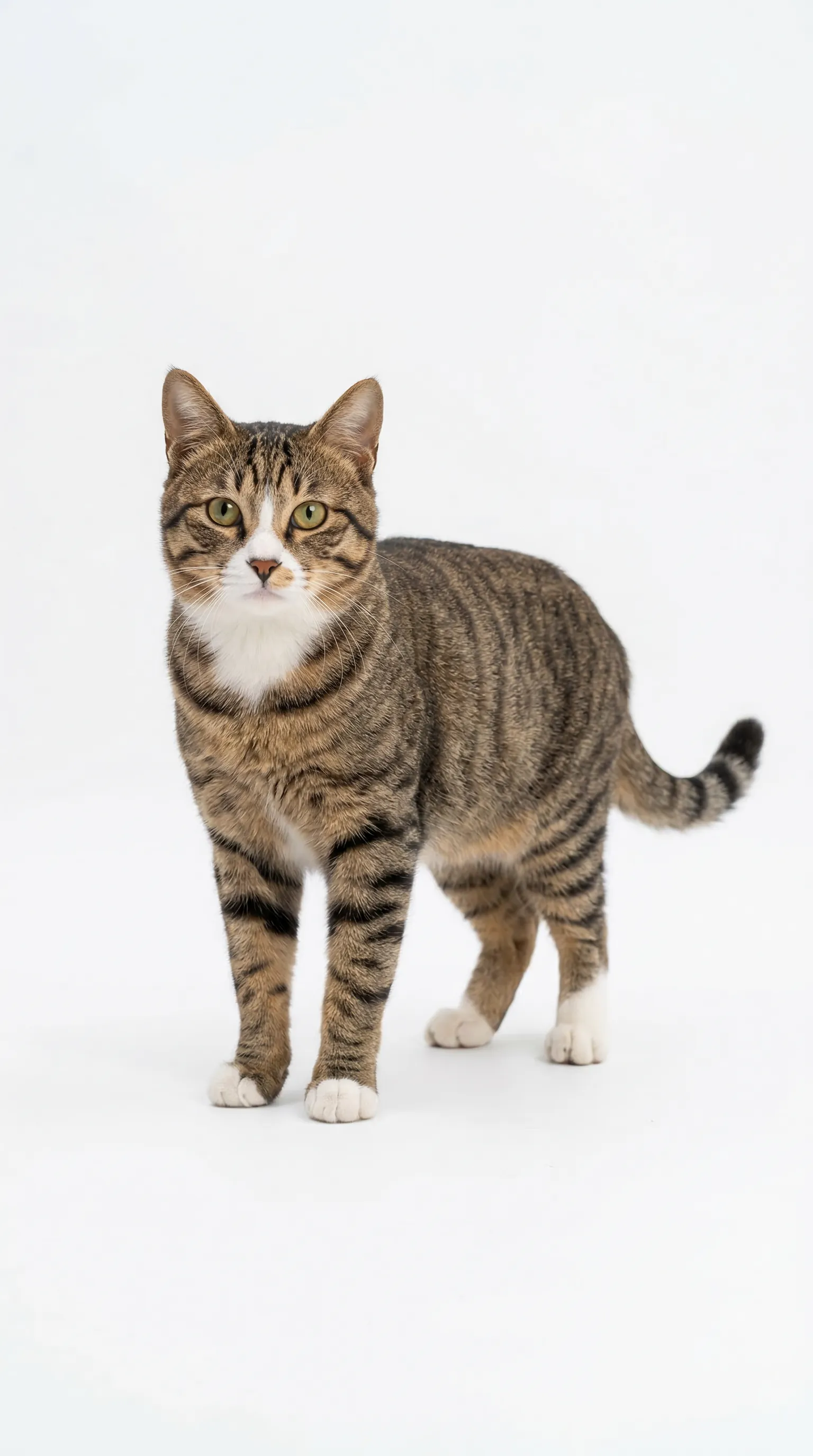
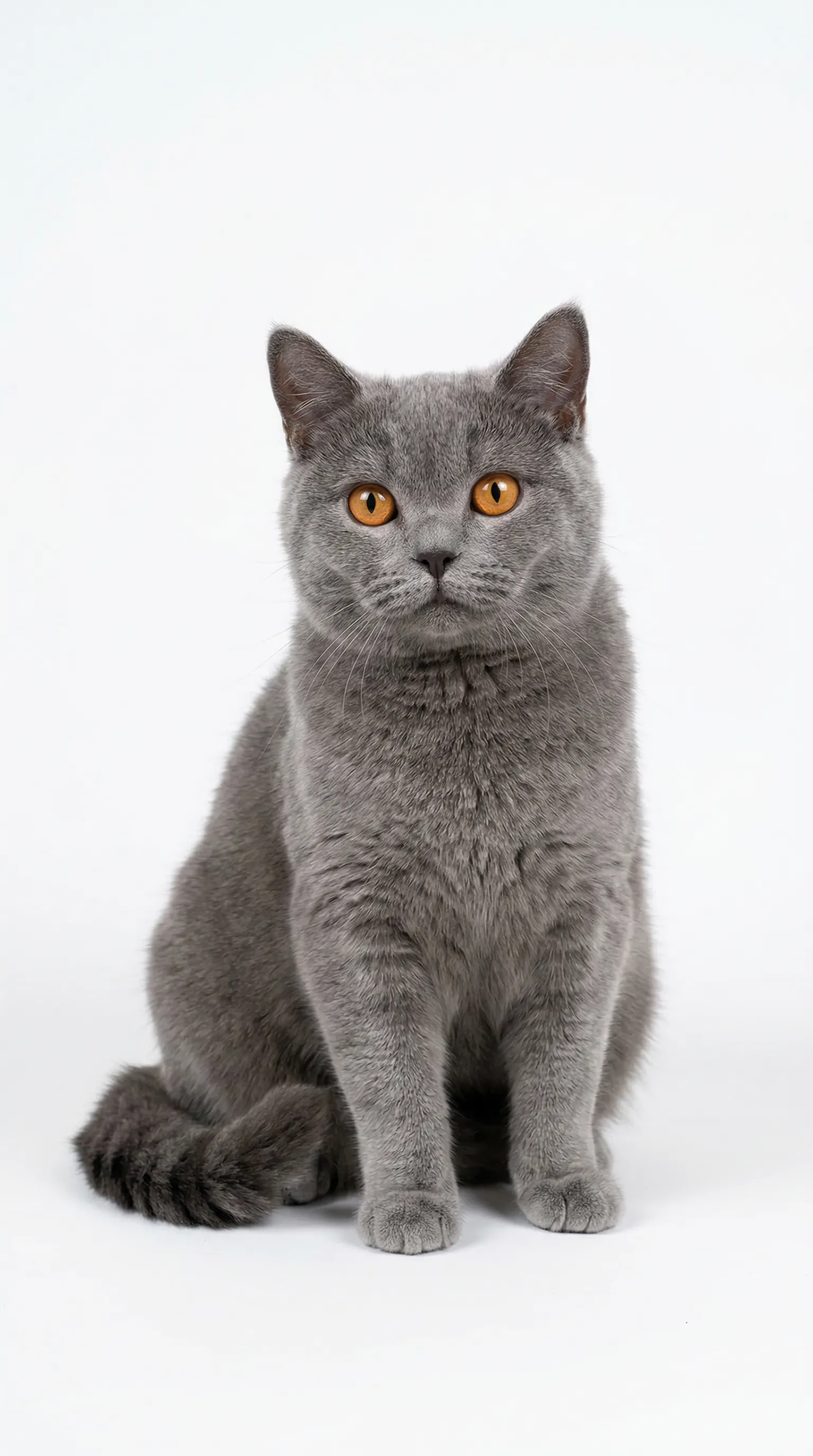
15s duration: This is a fun anthropomorphic scene full of contrast. Two cats are cosplaying as construction workers, working at a simulated construction site: On the left is Image 4, wearing a bright yellow hard hat, front paws resting on the edge of a rusty wheelbarrow, standing upright with a serious and slightly helpless expression, looking like a supervisor. On the right is Image 5, wearing an orange hard hat, also standing upright, front paws tightly gripping a shovel full of cement, focusing on shoveling cement from the ground into the wheelbarrow, with a serious yet hilarious posture. The background is a real construction site: damp cement floor, gray cement walls, piles of red bricks, blue oil drums, and scattered wooden sticks. The ground has water reflections, recreating the atmosphere of a rainy day or a newly finished site. The wheelbarrow is an old metal model with orange rims and cement stains. A spare yellow hard hat lies nearby, full of detail. Image 5, wearing the hard hat, shovels cement into the wheelbarrow, but twice it falls onto the head and face of Image 4. Image 4 angrily hits Image 5, and the two cats engage in a fierce fight.
Use case sẵn câu lệnh cho Gen-4.5
Runway Gen-4.5 hoạt động đặc biệt tốt khi bạn bắt đầu từ khung đầu mạnh và mô tả chuyển động rõ. Những ví dụ này dựng cho quy trình thương mại thật, không chỉ shot showcase.
Cảnh lifestyle dẫn nhân vật
Làm sống reference lifestyle thành khoảnh khắc nhân vật ngắn, cảm giác premium cho thời trang, beauty hoặc chiến dịch thương hiệu dẫn creator với liên tục mặt và vải mạnh hơn.
"Character-led lifestyle moment featuring a stylish subject in a modern environment. Use natural body movement, soft fashion-forward lighting, light fabric motion, and a smooth handheld or tracking camera that keeps the subject expressive, polished, and brand-friendly."
Quảng cáo chuyển động sản phẩm
Dùng Gen-4.5 cho reveal sản phẩm bóng nơi chuyển động, phản chiếu, chi tiết bề mặt và drift máy cần giữ gắn kết qua clip.
"Premium product commercial with a hero item centered in a dark studio setup. Use a smooth push-in, subtle orbit movement, glossy reflections, controlled highlight rolloff, and a clean luxury ad rhythm that keeps the product sharp and dominant throughout the shot."
Chuyện thương hiệu điện ảnh
Cho thương hiệu cần tông điện ảnh chỉ trong vài giây, Gen-4.5 xử lý chuyển máy, chiều sâu cảnh và kể chuyện dẫn chuyển động tốt hơn câu lệnh mô tả phẳng.
"Short cinematic brand sequence with strong atmosphere, layered depth, and purposeful movement through the scene. Emphasize moody lighting, story-driven framing, steady forward momentum, and a premium commercial tone that feels dramatic without losing clarity."
Clip concept stylized
Gen-4.5 cũng đẩy công việc stylized hoặc không photorealistic trong khi giữ chi tiết chủ thể và chuyển động ổn định hơn, hữu ích cho reel concept và teaser social.
"Stylized concept clip with exaggerated art direction, strong visual contrast, and playful cinematic motion. Keep the world design cohesive while using a clean tracking move, distinctive textures, and an imaginative tone that feels crafted for a concept teaser or social hook."
Gen-4.5 là gì?
Gen-4.5 là mô hình tạo video fidelity cao của Runway, dựng cho chất lượng chuyển động mạnh hơn, bám câu lệnh tốt hơn và nhất quán thời gian sạch hơn. Trong quy trình hình ảnh thành video, hình tải lên đóng vai khung đầu, nên chất lượng câu lệnh ít về mô tả điều thấy được và nhiều hơn về dẫn điều xảy ra tiếp. Trên Topview, điều đó trở thành quy trình sản xuất thực tế hơn: bắt đầu từ khung hero, định hình chuyển động và ngôn ngữ máy, so sánh đầu ra với mô hình khác, và đi nhanh hơn từ lần tạo thử đến giao sẵn quảng cáo.
Dẫn hình khung đầu
Gen-4.5 coi hình tải lên là khung bắt đầu, hữu ích cho shot sản phẩm, still thương hiệu và mọi quy trình nơi bạn muốn video neo vào hình đã duyệt.
Câu lệnh dẫn chuyển động
Mô hình hoạt động tốt nhất khi câu lệnh mô tả chuyển động, chuyển máy và hành động rõ. Nghĩa là kết quả tốt hơn từ hướng shot súc tích thay vì đoạn văn hình dài.
Khả năng kiểm soát điện ảnh
Runway Gen-4.5 được thiết kế cho ngôn ngữ máy chính xác, chân thực vật lý mạnh hơn và chi tiết ổn định hơn theo thời gian, giúp đội thương mại tạo clip cảm thấy có chủ ý hơn.
Cách viết câu lệnh Gen-4.5 tin cậy hơn
Câu lệnh Gen-4.5 tốt nhất giả định hình đã định nghĩa cảnh. Việc của bạn là dẫn chuyển động, máy và thời điểm rõ để mô hình làm sống khung đầu đó có mục đích.
Bắt đầu từ khung đầu mạnh
Vì hình tải lên trở thành khung đầu, dùng hình sạch, bố cục tốt với ánh sáng và tỷ lệ đúng trước khi viết câu lệnh.
Mô tả điều chuyển động tiếp
Tập trung câu lệnh vào chuyển động sau khung đầu: chủ thể làm gì, môi trường phản ứng thế nào, và cảnh tiến hóa đâu trong vài giây tiếp.
Dùng ngôn ngữ máy
Thuật ngữ như slow dolly-in, orbit, pan right, close-up hoặc low-angle tracking shot hoạt động tốt hơn yêu cầu mơ hồ về look điện ảnh.
Giữ một ý chuyển động mỗi clip
Clip ngắn với một hành động rõ dễ hơn cho mô hình theo. Tránh chồng nhiều cảnh, chủ thể hoặc hành động xung đột vào một lần tạo.
Giữ tích cực và trực tiếp
Dùng cách diễn tích cực và hướng dẫn đơn giản. Nói điều nên xảy ra, không phải điều nên tránh, và bỏ tính từ không cần không đổi chuyển động.
Khớp tỷ lệ và mục tiêu xuất
Đặt tỷ lệ, thời lượng và cường độ chuyển động theo use case cuối để đầu ra sẵn cho quảng cáo, landing hoặc giao social mà không cần lượt thứ hai.
Câu lệnh cơ bản so với câu lệnh sẵn Gen-4.5
| Yếu tố câu lệnh | Câu lệnh cơ bản | Câu lệnh sẵn Gen-4.5 |
|---|---|---|
| Setup khung | perfume bottle on table | uploaded product still used as the first frame on a glossy black pedestal |
| Chuyển động | make it move | slow dolly-in with a subtle clockwise orbit and light vapor drift |
| Máy quay | cinematic camera | macro close-up, locked center subject, smooth commercial camera move |
| Ánh sáng | nice lighting | soft silver rim light with controlled reflections and a dark studio background |
| Số hành động | lots of things happening | one clean motion beat over a 5-second clip |
| Tập trung câu lệnh | describe the whole image again | describe what changes after the first frame, not what is already visible |
| Phong cách câu lệnh | don't make it weird | use positive phrasing and state the intended result directly |
| Khớp giao |
Cách dùng Gen-4.5 trong Topview (3 bước)
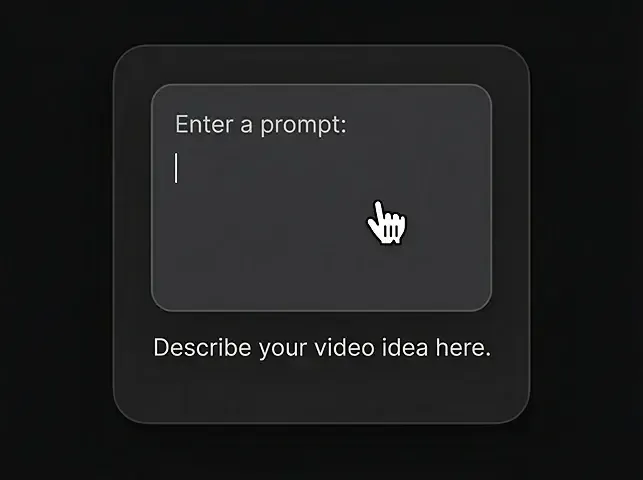
Nhập câu lệnh
Mô tả video bạn muốn bằng ngôn ngữ tự nhiên.
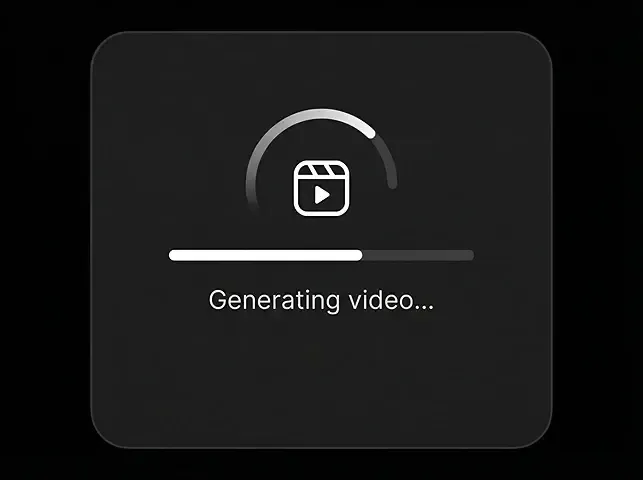
Tạo video
Bấm tạo và xem Gen-4.5 đưa ý tưởng thành hiện thực trong vài giây.
Tải video
Xuất MP4 sạch khi bạn sẵn sàng.
Khả năng cốt lõi Gen-4.5
Runway Gen-4.5 mạnh nhất khi bạn muốn quy trình hình ảnh thành video có kiểm soát với chuyển động sạch hơn, vật lý tốt hơn và ngôn ngữ máy có chủ ý hơn.
Kiểm soát khung đầu hình ảnh thành video
Dùng still tải lên làm khung neo để chuyển động bắt đầu từ sản phẩm, nhân vật hoặc hình thương hiệu đã duyệt thay vì từ lần tạo trống.
Chuyển động chất lượng cao hơn
Gen-4.5 cải thiện chân thực của chuyển động, đà và chi tiết bề mặt để shot cảm thấy ít trôi và neo vật lý hơn.
Nhất quán thời gian tốt hơn
Chi tiết tinh như tóc, vải, phản chiếu và texture giữ gắn kết hơn theo thời gian, quan trọng cho clip thương mại look premium.
Cảnh nhiều yếu tố phức tạp
Mô hình xử lý bố cục phức tạp hơn với nhiều vật thể, mảnh chuyển động và môi trường lớp tốt hơn trình tạo một chủ thể đơn giản.
Hướng máy điện ảnh
Câu lệnh chỉ rõ ngôn ngữ pan, orbit, tracking, dolly và close-up để đầu ra theo kế hoạch shot rõ hơn.
Định dạng sẵn marketing
Tạo clip ngắn ở tỷ lệ phổ biến cho landing, quảng cáo trả phí, TikTok, Reels, Shorts và nhu cầu vị trí thương mại khác.
Quy trình câu lệnh Gen-4.5: từ khung đầu đến clip cuối
Kết quả Gen-4.5 tin cậy nhất thường đến từ quy trình năm giai đoạn: khung, chuyển động, máy, duyệt, rồi giao. Đây là quy trình chặt hơn việc coi mỗi lần tạo như câu lệnh canvas trống.
Setup khung
Chọn đúng hình trước. Khung đầu sạch, đúng thương hiệu giảm drift sau và cho mô hình neo hình mạnh hơn.
Hướng chuyển động
Mô tả hành động tiếp rõ: chuyển động chủ thể, phản ứng môi trường, và beat chính xác nên xảy ra qua clip.
Ngôn ngữ máy
Thêm hướng shot như dolly-in, orbit, pan, góc thấp hoặc close-up để kết quả theo kế hoạch điện ảnh có chủ ý hơn.
Duyệt đầu ra
Kiểm nhất quán thời gian, fidelity sản phẩm, hành vi phản chiếu, ổn định nền, và mô hình có tuân brief chuyển động không.
Khớp giao
Xuất phiên bản khớp nhu cầu kênh nhất như quảng cáo 9:16, hình hero 16:9 hoặc cut social 1:1 mà không làm phức lần tạo.
Checklist quy trình
| Chỉ số | Khung | Chuyển động | Máy | Duyệt | Giao |
|---|---|---|---|---|---|
| Mục tiêu | Khóa nền hình | Làm rõ điều đổi | Dẫn shot | Bắt drift sớm | Giao cut tốt nhất |
| Đầu vào | Hình still mạnh | Một ý chuyển động | Ngữ pháp shot | Clip đã render | Mục tiêu xuất đã duyệt |
| Tập trung | Bố cục và ánh sáng | Hành động chủ thể | Chuyển động và khung | Nhất quán và chi tiết | Khớp kênh |
| Đầu ra | Khung đầu ổn định | Brief chuyển động rõ | Câu lệnh có cấu trúc | Biến thể tốt nhất đã chọn | Clip sẵn đăng |
| Đi tiếp khi |
Gen-4.5 so với mô hình video AI khác
Gen-4.5 mạnh nhất khi bạn muốn chuyển động neo hình, kiểm soát máy điện ảnh và nhất quán thời gian fidelity cao hơn trong quy trình thương mại dạng ngắn.
| Chỉ số | Gen-4.5Khuyến nghị | Veo 3.2 | Kling 3.0 | Seedance 2.0 | Sora 2 | Wan 2.7 |
|---|---|---|---|---|---|---|
| Thời lượng tối đa | 10s | 10s | 25s | 15s | 25s | 15s |
| Độ phân giải | 1080p | 1080p | 4K/60fps | 1080p | 1080p | 1080p |
| Hỗ trợ reference hình | Mạnh | Có | Hạn chế | Có | Có | Có |
| Chân thực chuyển động / vật lý | Cao | Cao | Trung bình-cao | Trung bình | Cao | Trung bình |
| Nhất quán thời gian | Cao | Cao | Trung bình | Trung bình | Trung bình-cao | Cao với reference |
| Mạnh nhất ở | Chuyển động điện ảnh dẫn hình | Chân thực giàu audio | Shot dài thông số cao | Tạo multimodal | Kiểm soát điện ảnh dẫn câu lệnh | Quy trình nặng reference |
| Quy trình khớp nhất | Khung đầu -> chuyển động -> xuất | Câu lệnh -> render -> xuất | Câu lệnh -> render -> chỉnh | Nhiều đầu vào -> render | Câu lệnh -> tạo -> tinh chỉnh | Reference -> render |
Vì sao dùng Gen-4.5 trên Topview
Topview khiến Gen-4.5 hữu ích hơn cho đội thương mại bằng cách đặt test mô hình, lập kế hoạch xuất và quy trình liền kề vào một chỗ thay vì biến mỗi câu lệnh thành thí nghiệm một lần.
Truy cập mô hình all-in-one
Test Gen-4.5 cạnh Veo, Sora, Kling, Wan và mô hình hàng đầu khác trong một không gian làm việc thay vì dựng lại cùng ý qua công cụ riêng.
Lặp câu lệnh sạch hơn
Topview giúp đội so sánh câu lệnh, khung đầu và đầu ra có hệ thống hơn để test chuyển động nhanh hơn và ít lãng phí hơn.
Giao nhanh hơn
Đi từ hình still đến media landing dùng được hoặc sáng tạo quảng cáo nhanh hơn bằng cách giữ tạo và lập kế hoạch xuất gần nhau hơn.
Cộng tác đội
Chia sẻ đầu ra với đồng đội, thống nhất biến thể tốt nhất, và giảm đi lại khi chiến dịch cần nhiều lựa chọn video dạng ngắn.
Khớp quy trình marketing
Dùng đầu ra Gen-4.5 trong quy trình Topview rộng hơn cho marketing sản phẩm, quảng cáo, hình hero, nội dung dạng ngắn và test sáng tạo.
Quy trình tạo all-in-one
Từ hình sang video sang đăng, Topview cho bạn hoàn thành toàn bộ quy trình ở một chỗ thay vì chuyển giữa công cụ riêng.
Bắt đầu tạo với Gen-4.5
Làm sống khung đầu mạnh, dẫn máy bằng câu lệnh chuyển động rõ, và xuất clip ngắn sạch hơn cho quảng cáo, kể chuyện sản phẩm hoặc media landing.
Kiểm soát khung đầu · Câu lệnh chuyển động điện ảnh · Đầu ra thương mại dạng ngắn